

A power distribution unit (PDU) is the last link between the electrical system and the IT load. This guide separates rack PDUs from floor-standing PDUs, compares the four rack PDU types and gives a step-by-step method for sizing, selecting and maintaining them.

Two Kinds of PDU
The term “PDU” is used for two very different products, and buyers should be clear which one they need:
- Rack PDU: a strip mounted in or on a server cabinet, with outlets for individual devices. It takes a single- or three-phase supply, usually through an industrial plug, and distributes it to servers, storage and network equipment.
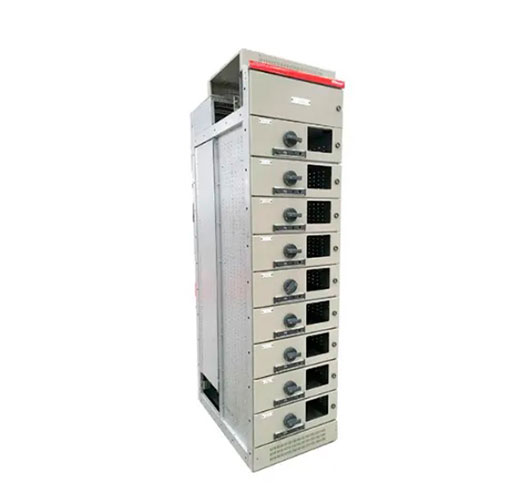
- Floor-standing PDU or power distribution cabinet: a low-voltage assembly built to IEC 61439, typically rated from about 100 A to 800 A at 400 V. It takes power from the UPS output and distributes it through breakers to many rack feeds. Some include an isolation transformer, branch circuit monitoring and hot-swappable outgoing breakers.
Most of this guide covers rack PDUs, with a section on floor-standing units at the end.
The Four Rack PDU Types
| Type | What it adds | Best for |
|---|---|---|
| Basic | Reliable distribution only, sometimes with locking outlets | Small server rooms with staff on site |
| Metered | Local display of current, voltage, power and energy, per inlet or per phase | Avoiding overloads and planning capacity |
| Monitored (network-metered) | Remote access to measurements over the network, often per outlet, with alarms | Multi-site operators and colocation billing |
| Switched | Remote on, off and reboot of individual outlets, sequenced power-up, outlet-level limits | Lights-out sites, edge data centers, labs |
Specialized variants include ATS rack PDUs, which give single-corded equipment two power sources, and hot-swappable PDUs, whose controller can be replaced without dropping the load.
Step 1: Size the Input Power
Start from the expected rack load, not from the number of outlets. Typical supply options at 230/400 V are:
| Supply | Plug (IEC 60309) | Nominal capacity |
|---|---|---|
| Single-phase 230 V, 16 A | 16 A, 3-pin | ≈ 3.7 kVA |
| Single-phase 230 V, 32 A | 32 A, 3-pin | ≈ 7.4 kVA |
| Three-phase 400 V, 16 A | 16 A, 5-pin | ≈ 11 kVA |
| Three-phase 400 V, 32 A | 32 A, 5-pin | ≈ 22 kVA |
| Three-phase 400 V, 63 A | 63 A, 5-pin | ≈ 43.5 kVA |
Leave headroom: many operators plan for no more than about 80% of nominal capacity in normal operation. With redundant A/B feeds, each PDU must be able to carry the full rack load alone if the other path fails, so in normal operation each one runs at roughly half of that limit. AI and GPU racks drawing 30-100 kW and more often need multiple high-current three-phase PDUs per rack, or busway tap-offs, sometimes combined with liquid cooling.
Step 2: Choose Outlets and Form Factor
- Outlet types: IEC 60320 C13 for most servers and switches (up to 10 A), C19 for high-power servers, blade chassis and storage (up to 16 A). Combination outlets that accept both plugs add flexibility.
- Outlet count: count every power cord, including dual-corded devices, and add 20-30% spare.
- Mounting: vertical (0U) PDUs save rack units and offer more outlets; horizontal 1U or 2U PDUs suit shallow or open racks.
- Protection: built-in breakers per outlet group limit the impact of a faulty device.
- Color-coding: different colors for A and B feeds reduce cabling mistakes.
Step 3: Decide on Monitoring and Control
Ask who needs which data. Facility teams want phase balance and capacity trends; IT teams want per-outlet power and remote reboot; finance wants energy per customer. Check that the PDU supports SNMP, Modbus TCP or a REST API compatible with your data center infrastructure management (DCIM) software, offers secure firmware updates and user authentication, and accepts temperature, humidity and door sensors.
Step 4: Plan the Floor-Standing PDU
For a hall with many racks, a floor-standing PDU or power distribution cabinet takes the UPS output and splits it into dozens of protected rack circuits. When selecting one, check:
- Design verification to IEC 61439 and environmental testing appropriate to the site.
- Rated current and short-circuit rating coordinated with the UPS and upstream switchboard.
- Branch circuit monitoring of current and energy for every outgoing breaker.
- Hot-swappable or plug-in outgoing breakers, so circuits can be added without shutdown.
- Optional isolation transformer for a local neutral-earth bond and noise reduction.
- Front access, cable entry from top or bottom, and footprint that fits the hall layout.
Installation and Maintenance Tips
- Mount rack PDUs with the manufacturer’s brackets and secure input cords with strain relief.
- Balance load across phases; an unbalanced three-phase PDU trips early on one phase.
- Commission every new PDU: verify correct phase rotation, earthing, alarms and network access before loading.
- Inspect periodically for loose connections and hot spots, using infrared thermography on floor PDUs.
- Test breakers, metering and any transfer functions according to the manufacturer’s procedures, with equipment de-energized and work done by qualified staff.
- Keep firmware up to date and review alarm thresholds as rack loads change.
Frequently Asked Questions
What is the difference between a PDU and a UPS?
A UPS stores energy and keeps the load running during a supply interruption. A PDU only distributes power; it has no stored energy.
What is the difference between a PDU and a power supply unit (PSU)?
A PSU sits inside a server and converts AC to the DC voltages the electronics use. A PDU feeds AC power to many PSUs.
Is a metered PDU enough?
If staff are on site and you only need to avoid overloads, yes. For remote sites, billing or outlet-level control, choose a monitored or switched PDU.
Work with METTZ Group
METTZ Group offers a wide range of power distribution boards and cabinets to suit many needs – from compact distribution units to IEC 61439 low-voltage cabinets for data center halls. Check out our website to learn more, or contact METTZ Group today to work with a representative.
